Really Real Compose Key on Mac OS X with Sun Type 6 Keyboard

I use a Sun Type 6 UNIX keyboard. I have used Sun keyboards for decades.  I really like them.  You can get one here or on ebay pretty cheaply: http://www.amazon.com/dp/B000MMZW36

I also like to type actual characters out like ½¾⅚⅞, ©, ñ, and so on without it taking any longer than necessary.  I use fractions often.  Fractions are sometimes more accurate than decimal, after all.

UNIX system keyboards have a Compose Key which allows you to compose a composite character by typing out its individual components. For example, copyright symbol is Command O C which types ©, a C inside of an O.  Trademark is Compose t m and types ™.  In fact, this behavior is defined in ISO-7000-2021 and is a core feature of Unicode.  The Unicode character for Compose is 0x10...which kind of implies its really important being such a low number.

Windows and Mac have never supported Compose or anything quite like it.  Mac does support Dead Keys, at least.  Weird combinations of keys mostly unrelated to the outcome which produce some third character for no obvious reason.  Windows makes you hold Alt and then enter the Unicode numeric value; a so-called Alt Code.  Awesome user interface, Microsoft.  UNIX Systems have supported Compose for decades as part of Unicode; Linux included, of course.

As such, UNIX computer systems made by companies like Falco and Sun and DEC included a Compose key right on the keyboard so, you know, you can type the entire alphabet from the keyboard.  Nifty!

Its been bugging me for ages that I can't do this on Mac OS X.  I can use the Option key to access many odd symbols like the old "closed apple"  from my childhood which is tremendously important on a Mac, apparently.  

So, there is a way to enable this quite easily.  Once you have the correct information.  Cocoa KeyBindings in OS X are lingering seemingly like a vestigial limb but have an absolutely awesome script-like language!  Bob Kȧres wrote a script called osxcompose which dumps X11 (UNIX) keymap files to a Cocoa KeyBindings dictionary file.  If you would like the gritty details "sam" at LOL Engine posted detailed OS X Real Compose Key instructions to his blog.  I have simply followed those instructions and created a file which implements a really real Compose Key as Cocoa KeyBindings.  They map Compose to F13 because the Mac OS X keyboard is missing a Compose Key.  I have a real Compose key and it now works!

To enable a Sun Type 6 to have a real Compose key on OS X simply create a folder in your Library folder called KeyBindings (~/Library/KeyBindings/ is the UNIX folder name) and drop in my Sun Type 6 OS X DefaultKeyBindings.dict file.
http://cdn.webaugur.com/misc/DefaultKeyBinding.dict

Logout/login and now when you hit Compose 1 2 you get ½.

I will likely update this file later on. The Type 6 has a lot more keys and the key bindings currently only fixes a single key.

I was amused to find that out of all the UNIX keys OS X doesn't support the Help key works.  Pressing Help turns the mouse cursor into a ? and opens help for the next object you click.  Sweet!  One less key to map.

Enjoy!
Computer Perspectives

Once upon a time I'd argue that the Unix system is better than certain other proprietary systems. Long before that I would've argued the exact opposite... Current iterations of those proprietary systems only serve to reinforce my belief; each new version offering little over the previous than cartoons to insult the user's intelligence and preinstalled spyware to "increase your productivity." They appeal to children in much the same way corny video-arcade games appealed to my generation. Douglas Adams explains the problem in Hitchhiker's Guide to the Galaxy:


...of Sirius Cybernetics Corporation products: 'it is very easy to be blinded to the essential uselessness of them by the sense of achievement you get from getting them to work at all.' In other words - and this is the rock-solid principle on which the whole of the Corporation's galaxywide success is founded - their fundamental design flaws are completely hidden by their superficial design flaws.


Read more: Computer Perspectives

Special Characters on Linux and UNIX Systems: The Compose Key

Have you ever wanted to spell jalapeño correctly but don't know how? Maybe you'd like to spell dæmon a little differently? What you want is the Compose Key!

The right hand meta key is often set as the Compose key. The meta keys often have a "Windows" logo on PC keyboards. UNIX system keyboards (e.g. Fujitsu Happy Hacking Keyboard) have a diamond symbol on the meta keys. Sun Type 5 keyboards also have a separate Compose key to the right of the right meta key. Compose works with all X11 applications.

Read more: Special Characters on Linux and UNIX Systems: The Compose Key

When will Linux be the best?

Loaded questions similar to "When will Linux be the best?" and statements like "Linux will be the best when it does X exactly like Y." really irritate me. First, it presumes that exactly one thing can be the best for everything. Second, the author of such a question always points to Windows, MacOS, or another OS the author favors as the current example of best. But that's not really my point at all.

Read more: When will Linux be the best?

Modern Desktop Linux & UNIX Systems

The graphical user interface most commonly found on Linux and UNIX Systems is the the X Window System. The X Window System is a basic framework upon which a comprehensive desktop environment builds the windows, icons, menus and such that you interact with on your screen. There are several desktop environments in use on current Linux and UNIX Systems. The oldest desktop environment still commonly used by proprietary UNIX Systems is the Common Desktop Environment. The K Desktop Environment is also a popular environment. This article will focus entirely on GNOME, the GNU Network Object Model Environment used by popular Linux and UNIX Systems. GNOME is one of the most user friendly environments available.

Read more: Modern Desktop Linux & UNIX Systems

Why is Windows Buggy?

Have you ever wondered why there are so many security bugs and viruses on Windows? Let me posit for a moment that it's because people who write software for Windows are swimming in a sea of incomprehensibility. Microsoft often apologizes with "Windows is more flexible than UNIX" when they compare the two. Right, it's more flexible. Of course it is. If by some chance you can actually understand how any of it works.

Read more: Why is Windows Buggy?

Fake Windows Antivirus Scams

Fake Windows Antivirus Scams

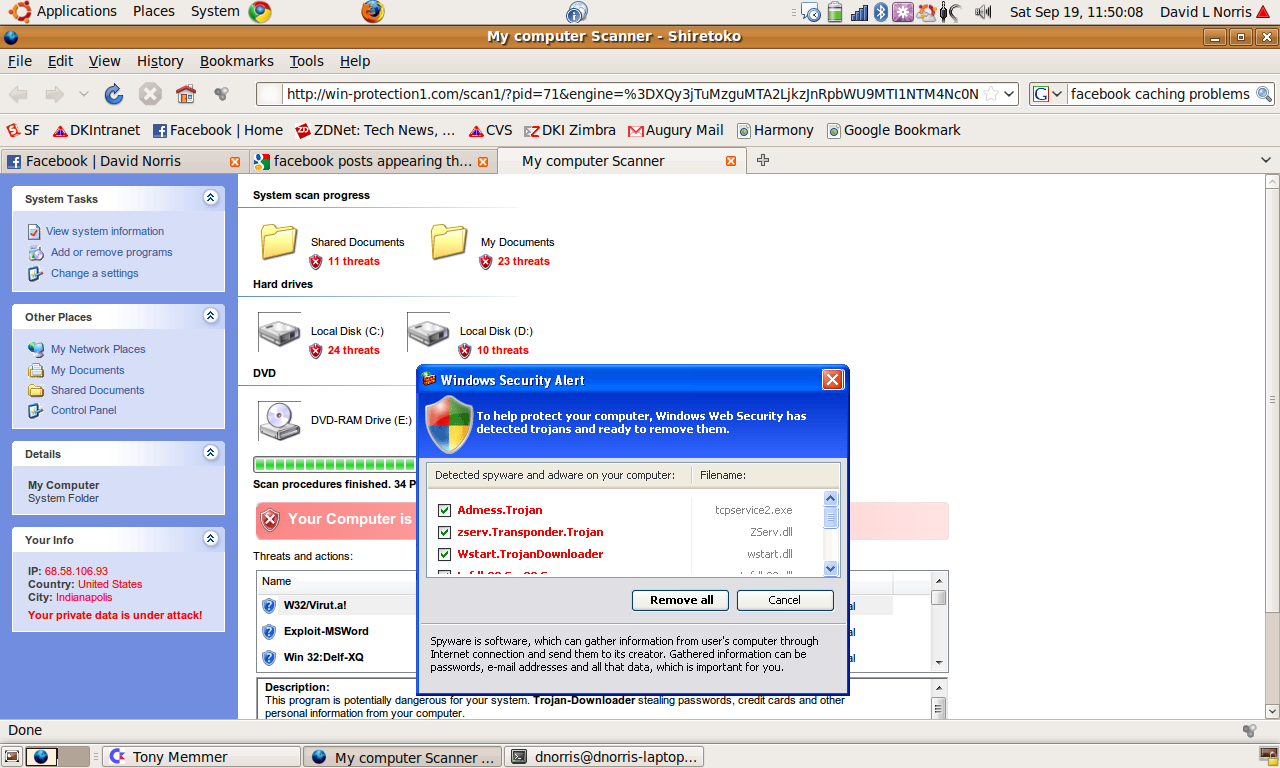
Seems like any time you search for Facebook these days one of the top results sends you to a fake anti-malware website trying to trick you to install actualmalware. I suspect it looks pretty convincing to those people using Windows PCs. However, I'm running Ubuntu 9.04 on all of my computers rather than Windows. Ubuntu is a full UNIX-like operating system similar to MacOS X but based on Linux instead of Steve Jobs ego. So these things just look ridiculous to me. My computers look absolutely nothing like a Windows desktop.

Read more: Fake Windows Antivirus Scams

Beware DVDs, CDs created on Windows Vista

Windows Vista uses a new DVD/CD format that nothing else supports. So, if you are making DVDs or CDs for friends on a Windows Vista machine then your friends probably won't be able to read it unless you've manually changed the disc writer settings to "Mastered" each time you burn a disc.
This is, of course, standard operating procedure for Microsoft: Introduce some new whizbang format (documents, disks, etc) into their latest products in an attempt to force the rest of the world to use their latest software. I don't care how much better someone at Microsoft thinks it is... If the rest of the world can't read the disc its nothing more than a worthless piece of aluminum foil glued to a coaster.
Update:Ubuntu Linux 8.10 can read LiveFS formatted discs.

Read more: Beware DVDs, CDs created on Windows Vista

Linux & Vista Slow Internet

If you are seeing slow Internet speeds under Linux (2.6.17 or newer) or Windows Vista make sure your router supports RFC 1323. If it does not then this is likely your problem. To fix it, upgrade or replace your router. RFC 1323 is a performance enhancement for TCP/IP networking which LInux and Vista support. Unfortunately, it seriously hurts performance if the network hardware doesn´t support it properly (or at all).

Red Hat Enterprise Linux Cluster Suite 5.2 DHCP Problems

Well, I learned another valuable clustering lesson today. Manually assign all of your IP addresses and do not rely on DHCP. I'd still suggest you have the IPs statically assigned on the DHCP server but don't rely on it at all.


Yesterday I rebooted all of the machines in the cluster simultaneously after making some extensive modifications to the iSCSI configuration on them all. (I'm using cluster-ssh to manage them all simultaneously.) All of the machines went down at exactly the same time and came up at exactly the same time. (They are identical hardware with identical software, afterall.)

Today, for whatever reason, when all of the leases expired at roughly the same time they didn't renew quickly enough. I walked out of a meeting this afternoon to all of the cluster nodes reporting "Quorum dissolved" and all services on the cluster were failed.